
5 WhatsApp Tricks Construction Bosses Wish They Knew
If you run a construction firm, you’re probably already running it on WhatsApp. Jobs, start times, lifts, who’s got the van. It works, until it doesn’t. A message gets buried, the wrong lad reads the wrong thing, and somebody turns up at the wrong site.
WhatsApp already has the tools to keep this tidy. Most firms just don’t use them. Here’s how I’ve seen it set up at the many different companies I’ve worked for: communities, groups, broadcast lists, and a simple way to name your contacts. I’ve worked in construction for fifteen years, in loads of different trades, across the UK, New Zealand and Australia. This is what I’ve seen work best, and it works for any trade, from scaffolders to sparkies, plumbers and roofers.
Start with a community, so your main group chat doesn’t get buried
You’ve probably seen the Communities button in WhatsApp and never tapped it. Most people don’t know what it does.
Most firms have one big group chat for everything. Jobs, photos, rotas, banter. A message goes in, and ten minutes later it’s buried.
A community fixes that. Keep your main group chat inside the community, and put all your other group chats underneath it, one for each department or job. Everything sits in one place. Each job has its own chat, so it keeps its own record, and nothing gets lost in the main chat.
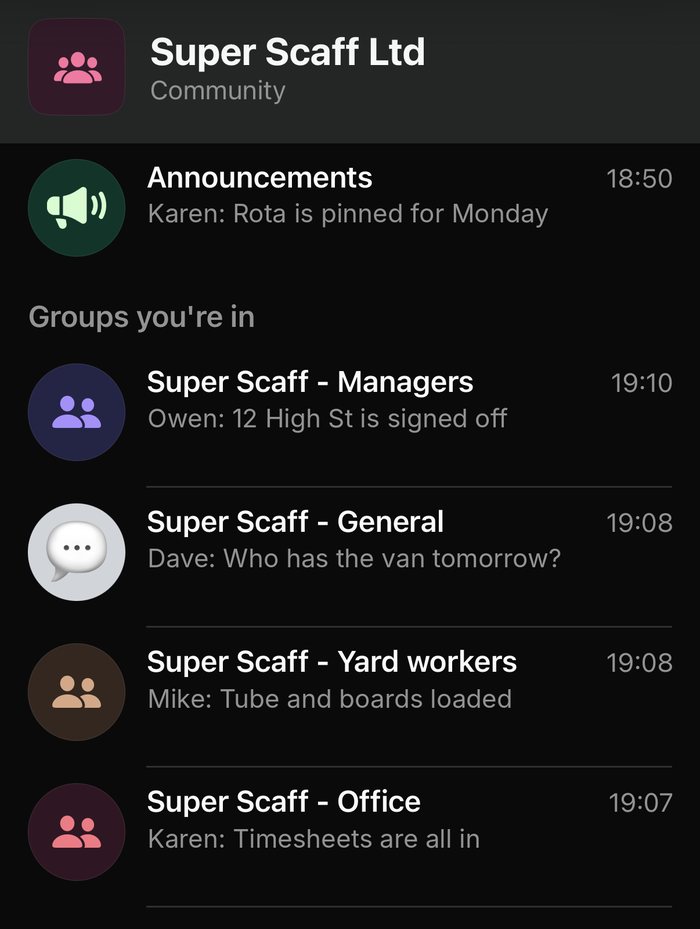
Whoever runs the firm can still send an announcement to everyone in the community.
It helps the boss and the lads. The boss has one place to send things that matter to the whole firm, like a safety notice or a change to pay day. The lads can find the group for their team without digging through their personal chats.
It’s worth setting up once you have more than a couple of teams. For a small crew, one group chat for the whole company is enough, so you can skip this.
Use a broadcast list to message one gang without bothering everyone
Say you need to tell one gang something, like where to be and when. If you put it in the main group chat, the whole company gets the notification, and the message gets buried.
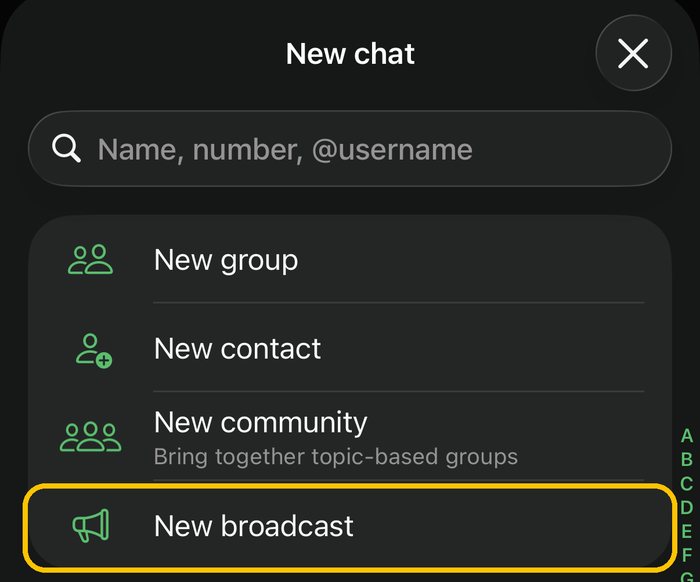
A broadcast list sends it to just that gang, and fast. Make a list for each gang. Send the message once, and each lad gets it in their own private chat. If they reply, the reply comes only to you, so nobody else has to read it. To make one, tap New chat, then New broadcast.
One thing to know: a broadcast only reaches people who have saved your number in their phone. If a lad hasn’t, they won’t get it. Ask everyone to save your number on their first day.
Make a group for each big job
A group is the opposite of a broadcast. Everyone sees everything, and that’s what you want when a team is on the same job.
- Make a group for a bigger job, and name it so nobody has to ask. For example: “Cardiff, 12 High St, Mon 12 Oct”.
- Put the address, a Google Maps pin, the start time and the contact in the group description, so it is always there.
- Pin the day’s rota or the job sheet to the top of the chat, so everyone can see it straight away without scrolling. The manager pins the new one each day.
- If you don’t want people spamming a group, change the setting so only admins can send messages. Then it’s just for the rota and the notices that matter.
- Use a poll to ask who is free for Saturday. WhatsApp groups have polls built in.
- Use an event for a safety talk or a start-up meeting. People can say if they are coming.
- Send the rota, job sheet or drawings straight into the group as a file.
- When the job is finished, leave the group or archive it, so old jobs don’t clog up your phone.
Keep a group for the people who need it. If a lad’s not on that job, they don’t need to be in that chat.
How we use it on my festival jobs
On my festival work, every department has its own group chat, and each department has its own area to work in. Whoever is in the group posts what they have completed, so everyone can see how it was done. We post updates as it happens, while it’s still fresh in our minds, including anything that slows us down.
One year, the stage was built differently from the year before. I had to change how we built the scaffold for the decor. We put photos of it in the chat. The next year, we went back to that chat and knew exactly what we had done. Nobody had to guess or remember. You can search the chat, or scroll through all the photos, and see what happened.
Festival crews take to this quickly. They use groups, communities and polls without being shown. Some of the scaffolding firms I’ve worked for are less used to it, so start small and show them how it works.
When you do lots of small jobs
A group for every job is too much if your firm puts up ten jobs in a day. You’d have ten chats a day to keep up with.
On the firm I work for, we do it another way. The lad sends a photo of the finished job to one of the managers. The manager says OK, or says what needs fixing. All the job photos end up in the manager’s chat. If anyone asks about a job later, the picture is there, with the date.
Use a group to track who has borrowed what
On my festival jobs, painters, climbers, scaffolders and carpenters all share the same equipment. So we have a group for borrowing kit. When someone borrows a tool, like a sledgehammer, they take a photo of themselves holding it and post it in the group. When it comes back, they post another photo.
Now you can scroll through the photos and see who took what, and when. Nobody has to guess who still has the sledgehammer.
Want hours written down on the day, not guessed on a Friday? ClockPilot does it inside WhatsApp. There is a 7-day free trial.
Message me on WhatsAppName your contacts so you can find them
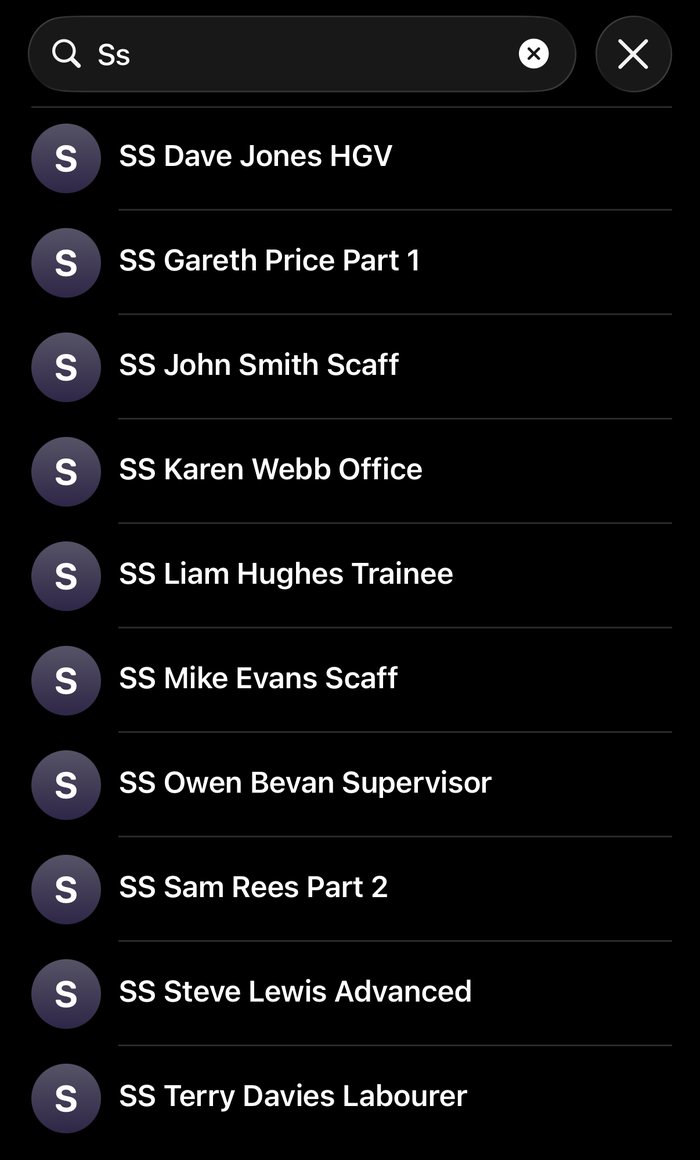
When you save a new lad’s number, put your company name, or its initials, at the front and their trade or grade at the end. You’ll find the right person in seconds, and a new starter’s number stands out from a mate’s. For example, if your firm is called Super Scaff, start every name with SS.
- SS John Smith Scaff
- SS Terry Davies Labourer
- SS Sam Rees Part 2
- SS Dave Jones HGV
If you use the same pattern every time, you can search “SS” and see everyone in the firm, without your mates and family coming up. Search “HGV” and you see who can take the lorry. It also helps when you build your broadcast lists, because you can pick the right people quickly.
More tips, and what to watch
- Send a Google Maps pin, not just the address. Lots of roads share the same name, so an address alone can send a gang to the wrong place. Send the exact spot as a pin, or a Google Maps link. Everyone has Google Maps, so the lads tap it and it takes them straight to the right job.
- Keep pay and personal things out of groups. Everyone in a group can see everyone else’s number and every message. Talk about pay one to one, or use a broadcast list.
- Tell new lads before you add them. Their number will be visible to the rest of the group.
- Remove people who leave. Do it the same day, so they don’t keep seeing job details.
- Agree quiet hours. A message at 10pm isn’t an instruction for the morning. Say when you will and won’t reply.
- Don’t use chat as your only record. Messages get buried, deleted, or lost with a phone. Hours, pay and safety paperwork need a proper record.
You probably don’t need another app
Some companies try to pull you off WhatsApp and sell you a new app. They’re selling you a fix for something WhatsApp already does, and WhatsApp is free.
Your lads already use it every day, and nobody needs training. Before you pay for anything new, check whether WhatsApp can already do the job.
Keep job details in Google Drive
Google Drive is another free tool that works well alongside WhatsApp. Save your job details there: drawings, job sheets, certificates and paperwork. Then send the link in the group, and anyone you share it with can open it.
Most people already have a Google account, so nobody needs to sign up for anything. And unlike a chat, the files stay in one place where you can find them.
Where WhatsApp stops
WhatsApp is good for telling people things. It’s not good for keeping a record of who worked when. If you want hours written down on the day, that needs something built for it.
That’s why I built ClockPilot, and it runs inside WhatsApp. Each lad gets a message at start time, taps “Send your current location”, and is clocked in. The same at the end of the shift. The times are saved in a Google Sheet, and you can see who is on site right now.
There is a 7-day free trial, and I’ll set it up for you. Message me on WhatsApp and we’ll get your lads on it.
Message me on WhatsAppWant to read more? Have a look at timesheets for scaffolders, or how to cut your weekly wage bill without docking your lads’ hours.
WhatsApp for construction firms: common questions
Can I message one gang on WhatsApp without the whole company seeing it?
Yes. Make a broadcast list for that gang and send the message once. Each person gets it in their own private chat, and any reply comes only to you.
Why didn't my WhatsApp broadcast reach everyone?
A broadcast only reaches people who have saved your number in their phone. Ask every new lad to save your number on their first day.
What is a WhatsApp community, and does my firm need one?
A community keeps your main group chat and your other group chats together in one place, and lets the boss send an announcement to everyone. It is worth setting up once you have more than a couple of teams. A small crew can manage with one group chat.
Is WhatsApp enough to run a construction firm?
It is good for telling people things, such as where to be and when. It is not a record of who worked when, so hours, pay and safety paperwork need a proper record kept somewhere else.